Troubleshooting Missing Meters for Reservations
Last modified on:
Overview
This document addresses the issue of not seeing meters for certain reservations, such as being able to view meters on monthly reservations but not on weekly ones.
Prerequisites
- Access to the meter setup configuration.
Steps
- Review Configuration:
- Check the configuration in the meter setup.
- Specifically, review the "Charge on stays exceeding (# of days)" value.
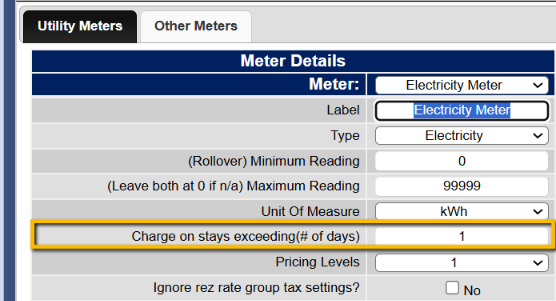
- Navigate to the Meter Setup:
- Go to Menu.
- Select Setup.
- Choose Meter Setup. - Adjust Meter Display:
- Enter a value that matches the criteria of the specific reservations for which you want meters to be shown.
Troubleshooting
- Ensure that the configuration settings match the reservation types for which you want meters to be displayed. Adjust the "Charge on stays exceeding (# of days)" value as necessary.