Setting Up Closed Dates for Units
Last modified on:
Overview
The Closed Dates button in Unit Setup is a useful tool for indicating periods when a selected unit is closed. This feature eliminates the need to manually adjust schedules or enter inventory overrides to mark units as unavailable. For example, you can specify that Unit #1 is closed on Mondays and Wednesdays, or from March 1st to May 1st.
Prerequisites
- Access to the Unit Setup section in the system.
Steps
- Navigate to Unit Setup:
- Click on the Menu button.
- Select the Setup tab.
- Click on Unit Setup. - Select a Unit:
- Click on the desired unit.
- Click on the Closed Dates button.
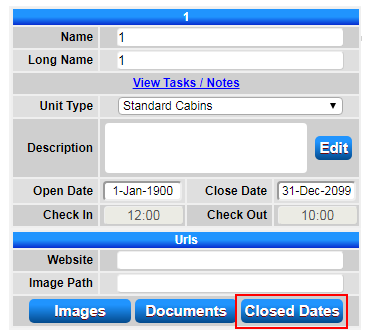
- Select Closed Dates:
- Choose specific days within a date range or all days within the date range to apply as closed. - Availability Grid:
- Once the Closed Dates are set, the Availability Grid will display a "Unit Closed" message on those dates.
Troubleshooting
For detailed instructions, refer to the Setting up closed dates for a unit document.