Occupant Visibility Issue During Reservation
Last modified on:
Overview
The issue of not seeing occupants during a reservation occurs because an occupant type does not have a rate assigned to it for the applicable Rate Group.
Prerequisites
- Access to the system's Menu button
- Permissions to modify Rate Setup
Steps
- Click on the Menu button.
- Select the Setup tab.
- Click on Rates Setup within Pricing and Rates.
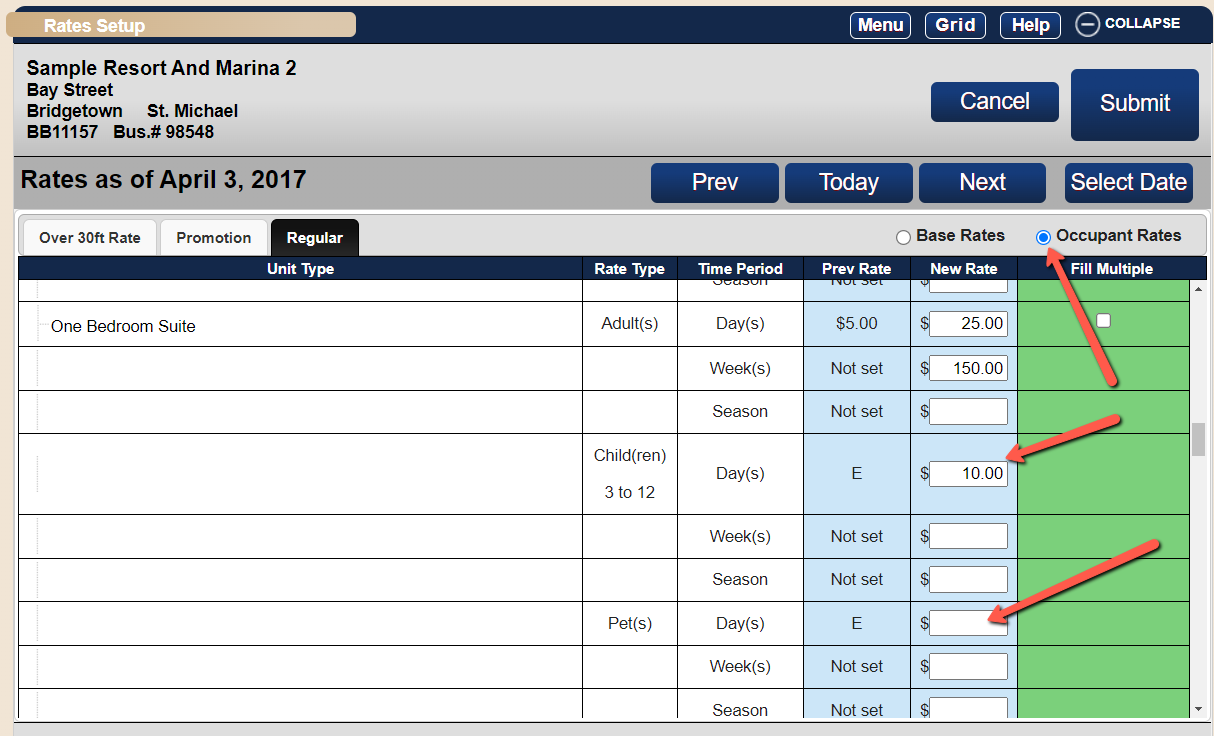
- On the Rate Setup screen:
- Select the Occupant Rates radio button.
- Enter the additional rate per occupant.
- If multiple Rate Groups have been created, enter the Occupant Rates for the Unit Types.
Troubleshooting
- If there is no charge for additional occupants, set the charge as zero "0" for the Day(s)/Night(s) time period only.
- For other time periods, enter the rate for those periods. If there is no rate, leave them blank. Do not enter zero "0" if the extra person needs to be calculated at a daily rate only.
- If occupants are not accepted in a particular Unit Type, leave the New Rate column blank for that Unit Type.
For further assistance, please call or email us at support@digitalrez.com.