Improved Calendar Quote Tool for Group Bookings
Last modified on:
Overview
The Calendar Quote Tool has been updated to enhance the booking process, making the creation of large group bookings quicker and more efficient.
Prerequisites
- Access to the Calendar Quote Tool interface.
Steps
- Enter Units:
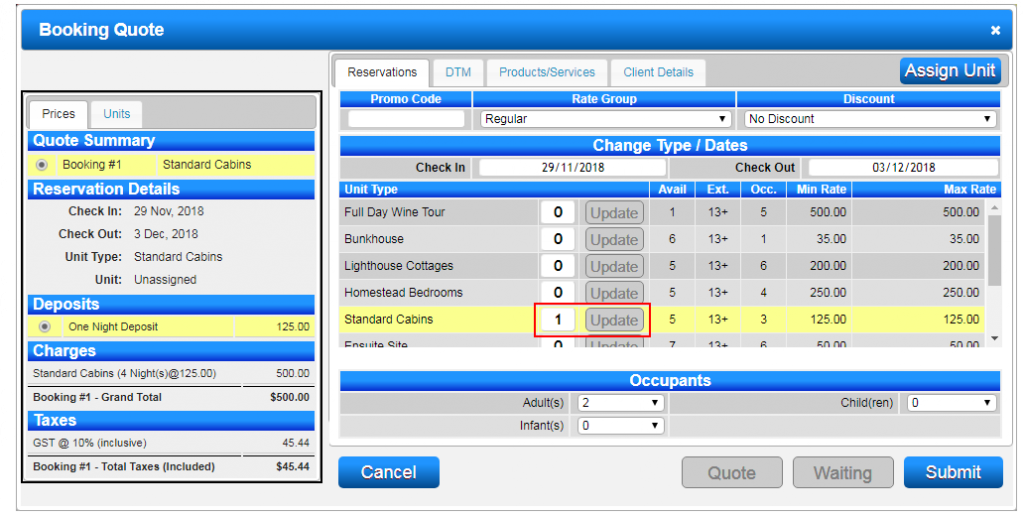
- The + and - symbols have been replaced with a free-form numeric field.
- Type the number of units required next to the Unit Type.
- Press Update to confirm the number of units.
- To decrease the number of units, enter the new value and press Update. - Build Booking Quote:
- The Booking Quote will automatically adjust based on the entered number of units. - Complete Booking:
- Assign occupants to the booking(s).
- Press Submit to finalize the Booking Quote.
Troubleshooting
- Ensure the correct number of units is entered before pressing Update.
- Verify all occupants are correctly assigned before submitting the booking.