Revenue and Occupancy Statistics Overview
Last modified on:
Overview
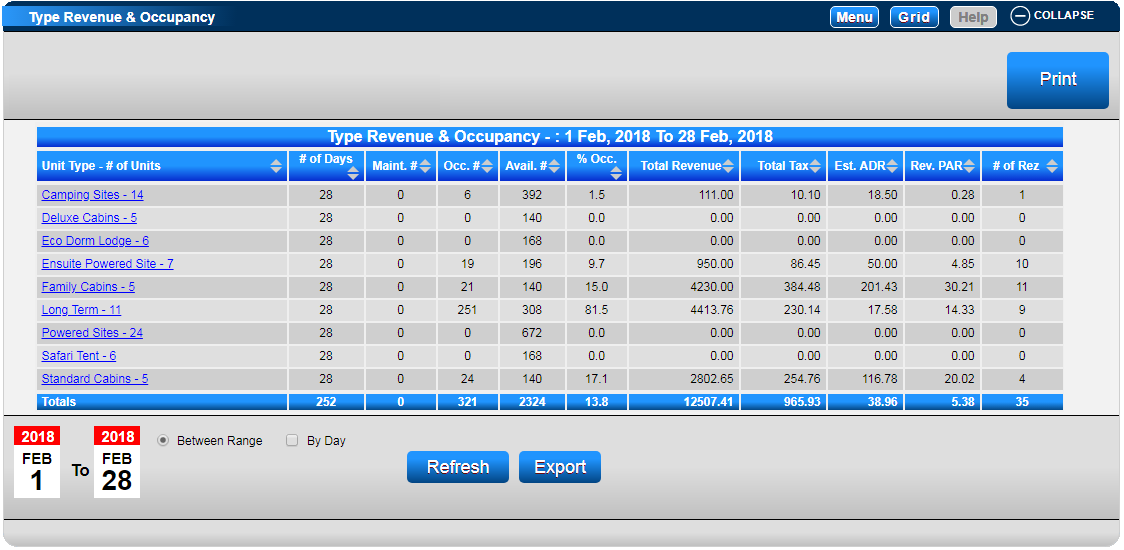
The Type Revenue & Occupancy panel allows you to view statistics for all Unit Types over a selected date range. This data can also be broken down by each Unit.
Prerequisites
- Access to the RezExpert dashboard.
- Date range limit: 366 days or less.
Steps
- Accessing Statistics:
- Click Dashboard from your Menu Bar to view your Type Revenue & Occupancy statistics in RezExpert.
- Alternatively, click on a Menu button, select the Admin tab, and click on Type Revenue & Occupancy within the Analytics section. - Viewing Type Revenue & Occupancy:
- Displays revenue statistics related to the Unit Type as a whole.
- The number of Units within a Unit Type is displayed next to the Unit Type (e.g., Ensuite – 6).
- Select the date range. A maximum of 366 days can be searched at any one time.
- Note: To analyze a period larger than 366 days, export results to compile within Excel. - Viewing Unit Revenue & Occupancy:
- Click on a Unit Type within Type Revenue & Occupancy to display the revenue broken down to specific units.
- Unit Number – Unassigned displays reservations that have not been assigned a unit.
- To view other Unit Types’ Unit revenue, click on the Unit Type Drop Down to select another unit type. - Print and Export Options:
- Click Print to print out the Type Revenue and Occupancy Report.
- Click Export to export the statistics into an Excel spreadsheet.
- Note: Within the Export display, Number of Service Booking Days = Maint. #
Troubleshooting
- Ensure the date range does not exceed 366 days.
- For periods longer than 366 days, use the export function to compile data in Excel.
Definitions of Columns
- # of Days: Number of days within the searched date range.
- Maint. #: Number of Maintenance pencil ins made.
- Occ. #: Number of Units occupied/booked.
- Avail #: Total number of Units available for the days selected ( #of units X # of days).
- % Occ.: Percentage of available units occupied (Occ # divided by Avail #).
- Total Revenue: Amount of revenue (reservation charges) charged.
- Total Tax: Amount of Tax on charges.
- Est. ADR: Estimated Available Daily Revenue (Total Revenue divided by Occ #).
- Rev. PAR: Revenue per available room (Total Revenue divided by Avail #).
- # of Rez: Total number of reservations made.
For further assistance, click here to print the Help Document.