Analytics - Client Panel Overview and Features
Last modified on:
Overview
The Analytics - Client Panel provides users with valuable insights into their clients' reservation history. This includes detailed information on reservations such as:
- Days stayed
- Total reservation days
- Average length of stay
- Revenue generated per client
The panel also tracks demographic data for further analysis opportunities.
Prerequisites
- Access to the Analytics - Client Panel through the following navigation:
- Menu
- Analytics
- Analytics - Client
Steps
Panel Features
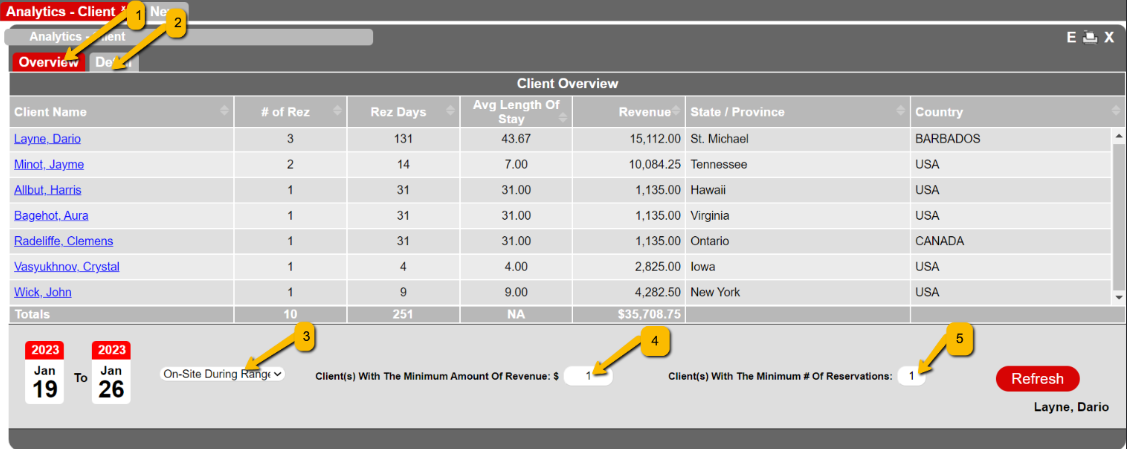
- Overview: Displays all clients with reservations within a specified date range.
- Detail: Provides specific data for a selected client.
- On-site during range: Filters clients who were on the property within a selected date range.
- By Check-in date: Filters reservations by check-in date.
- By Check-out date: Filters reservations by check-out date.
- Client(s) With The Minimum Amount Of Revenue: Filters by revenue greater than or equal to a specified value.
- Client(s) With The Minimum # of Reservations: Filters by a minimum number of reservations.
Data Columns
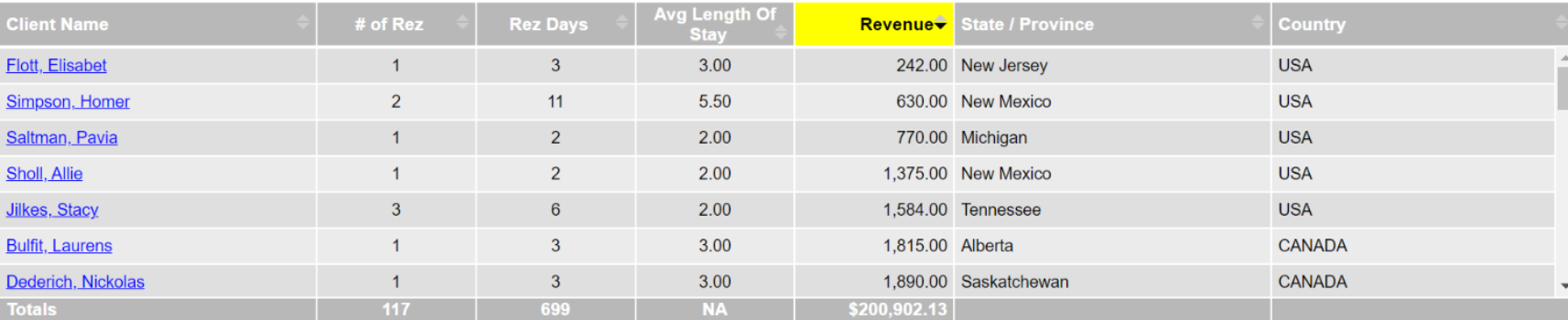
- # of Rez: Number of reservations made by the client
- Rez Days: Total number of nights the client stayed
- Avg Length Of Stay: # of Rez / Rez days
- Revenue: Generated revenue from the client.
Troubleshooting
For any issues accessing or using the Analytics - Client Panel, please refer to the internal support documentation or contact the support team for assistance.