Creating Wholesaler Reservations in Availability Grid
Last modified on:
Overview
This document provides instructions on how to create a reservation for a Wholesaler Business.
Prerequisites
- Access to the Availability Grid
- Wholesaler client record
Steps
Wholesale Reservation Creation
- From the Availability Grid, press the Search button.
- Select the Business tab and search for the Wholesale client record.
- Once selected, the Wholesaler will appear on the right-hand side of the grid panel.
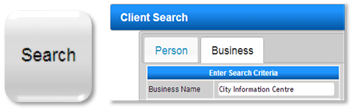
- Create Reservation(s) for the selected dates and Unit type using either the Rez Quote or Calendar Quote tool.
Wholesale Reservation Charges
- The reservation will automatically display the Wholesale rate charged for the selected dates and unit types.
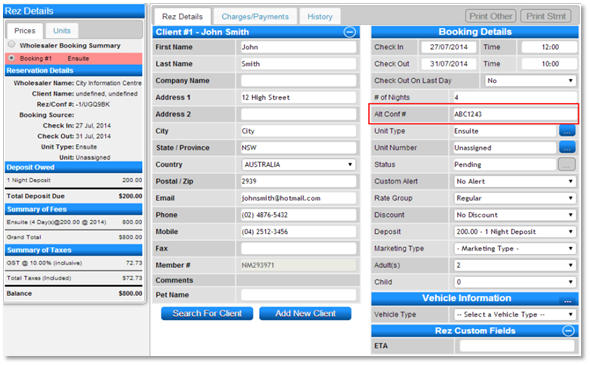
- In Guest Folio, select Booking #1 to enter the Guest’s name and details.
- In Booking Details, enter an Alt Conf# which is the Confirmation/Booking number given by the Wholesaler.
- Add Occupants and any remaining required information (e.g., Custom Alert, Vehicle Information).
- Press Submit to finalize the reservation.
Reservation Charges & Identification
- The reservation charges are associated in the Wholesaler Booking Summary for transfer to the AR Account at Check Out.
- In the Charges/Payments tab, select Payment Type AR Transfer to transfer the balance to the Wholesaler’s AR Account.
- The reservation will display on the Availability Grid under the Client’s name, with the Wholesale name attached for easy identification.
- In the Arrivals/Departures Panel and reports, the reservation displays under the Client’s name.
- You can also search by the Alt Conf# in the reservation search panel.

Viewing Wholesale Reservations
- To view all Wholesale Reservations (Made or Due in a selected Date Range), click Channel from the Menu Bar.
- The Reservation Manager panel displays all reservations according to their Booking Source.
- Click on the Wholesalers tab to view all reservations made for Wholesale businesses.
Troubleshooting
For more information on creating Wholesaler Records, click here to view how to create Wholesaler Records.