Adding Day Visitor to Checked-in Reservation
Last modified on:
Overview
A person may arrive to stay just one day/night of a registered (Checked-in) Guest's reservation.
Prerequisites
- Access to the Availability Grid or the Registered tab of the Arrivals/Departures (In/Out) panel.
Steps
Reservation Guest Folio
- Locate the staying Guest’s reservation from either the Availability Grid or Registered tab of the Arrivals/Departures (In/Out) panel.
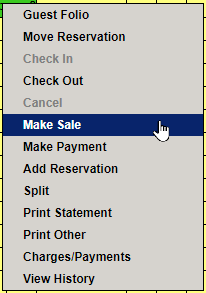
- From the Availability Grid:
- Right-click on the reservation and select Make Sale.
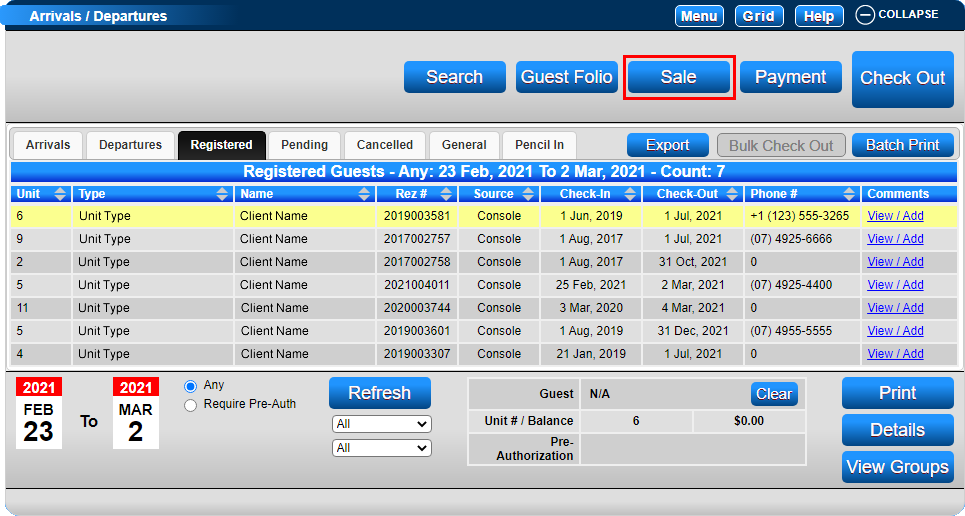
- From the Arrivals/Departures panel:
- Select the reservation and click Sale.
New Sale/Quote Screen
- The New Sale/Quote screen will appear, and the extra Day/Night visitor sale can be charged for the period they are staying.
- Select:
- Product Group: Occupant Products.
- Product Label: Select the Occupant Type, e.g., Adult.
- Quality: Enter the number of days, e.g., 1 Adult visiting for 2 days – Quality: 2.
- Price per Unit: Enter the amount to charge per visitor per day.
- Click Post (or anywhere on the screen) to allow the system to calculate the Tax for the sale.
- Click Post again to post the charge.

- Repeat this process if multiple Occupant Types are visiting.
Payment Options
After all the visitor charges have been posted, there are two Payment Options:
- Instant Payment – transaction NOT displayed on Reservation Balance (separate invoice):
- Select the Payment Type being used, e.g., Cash.
- Click Post to post the payment.
- Click Submit to finalize the payment and sale.
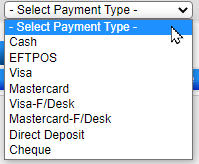
- Reservation Balance – If the sale is to be recorded on the Reservation and included in the Reservation Balance:
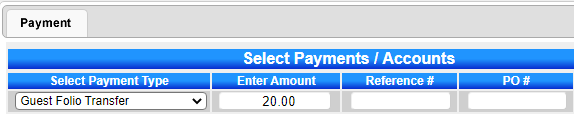
- Select the Payment Type: Guest Folio Transfer.
- Click Post to post the payment.
- Click Submit to finalize the payment and sale.
- Press the Guest Folio button to open the Guest Folio.
- Click on the Charges/Payments tab to process the payment for the sale.
Troubleshooting
For further assistance, refer to the Help Document.