Viewing Guest List on Availability Grid
Last modified on:
Overview
View all confirmed and checked-in reservations in your Guest List on the Availability Grid.
Prerequisites
- Access to the Unit Availability Grid.
Steps
Guest List
- While on the Unit Availability Grid, click the chrome button labeled "Guest List."
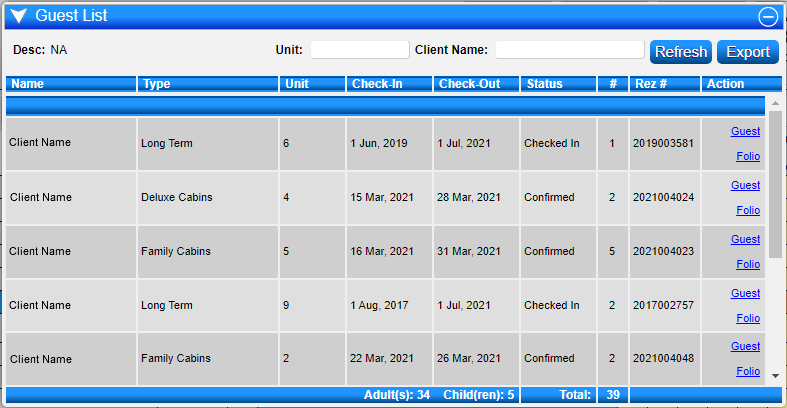
- This action will display a list of reservations due to check in today, as well as current checked-in reservations.

Guest List Display
- The Guest List shows:
- Status of each reservation (Confirmed or Checked In)
- Number of occupants
- Access to each reservation's Guest Folio
- Occupant breakout and total number of occupants
Period of Time
- To view the guest list for a specific period:
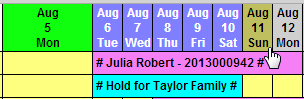
- Drag the mouse across the dates at the top of the Unit Availability Grid.
- Click "Guest List" to produce a list of all reservations for that period.
Unit Number Guest List
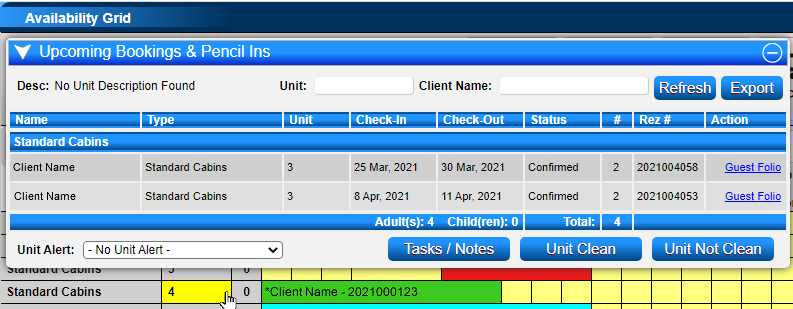
- Clicking on a Unit number will display a list of all upcoming bookings and pencil-ins assigned to that particular unit number.
Troubleshooting
For additional help, click here to print the Help Document.