Setting Minimum Days in Advance Rule
Last modified on:
Overview
The Minimum Days in Advance rule is designed to restrict the number of days in advance that customers can book their reservations. This rule is applicable to regular Unit Types and ensures that customers provide a minimum notice period before their arrival date. For example, if you want customers to book at least one day in advance, this rule can be set up to enforce that requirement.
Prerequisites
- Access to the Admin tab in the system.
- Permissions to configure Rule Setup.
Steps
Location
- Click on the Menu button.
- Select the Admin tab.
- Click on Rule Setup.
Add
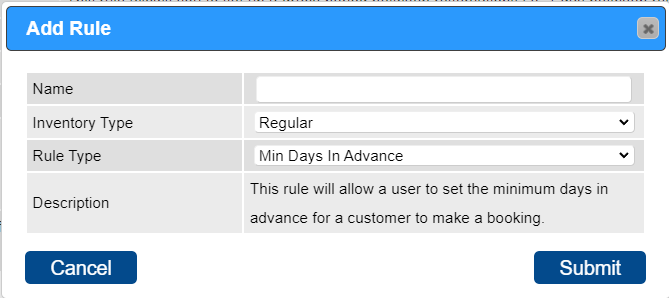
- Name: Enter the name of the rule, e.g., "Minimum Days in Advance."
- Inventory Type: Select "Regular" from the Inventory Type dropdown.
- Rule Type: Choose "Min Days in Advance" from the Rule Type dropdown.
- Press "Submit."
Rule Setup
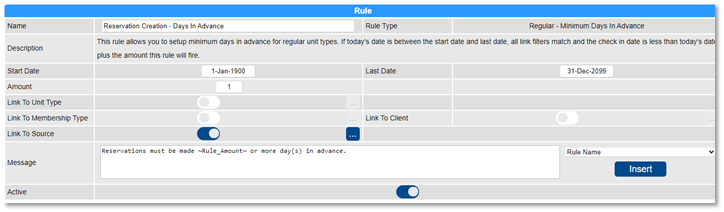
- Start Date: Select the start date of the rule using the calendar.
- Last Date: Choose the last date of the rule. For an indefinite period, select 31 Dec 2099.
- Amount: Enter the number of days required as notice prior to arrival.
Links
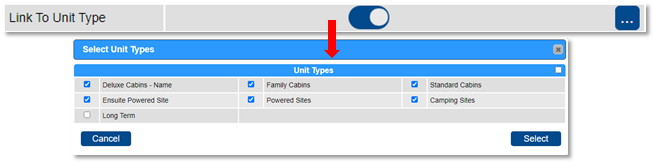
- Link To Unit Type: Apply the rule to selected Unit Types. Use the slider to select specific Unit Types or untick the flag to apply to all.
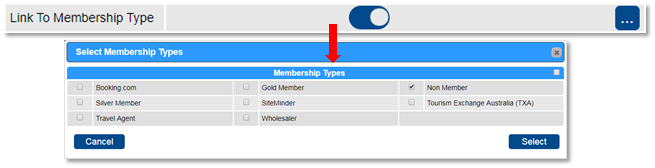
- Link To Membership: Apply the rule to selected Member Types.
- Link To Client: Search and apply the rule to selected Clients. Untick the flag to apply to all clients.

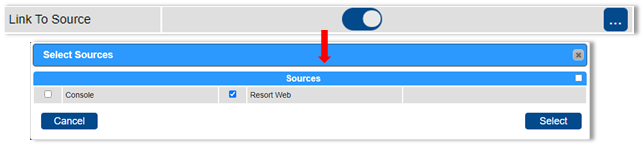
- Link To Source: Specify where the rule will be enforced, e.g., for Online Bookings (Resort Web) only.
Message
- Customize the message displayed when the rule is not met. Wildcards can be inserted to dynamically display data.
- Once all settings are configured, activate the rule by clicking the Active flag.
Troubleshooting
For further assistance, refer to the Help Document.