Enable Auto Assign Unit on Grid Setting
Last modified on:
Overview
A new option has been added which automatically assigns a unit/site when dragging on the Grid and clicking on the Rez Quote button.
Prerequisites
- Access to the system's menu and setup options.
Steps
- Enable Auto Assign Unit on Grid Setting:
- Click on a Menu button.
- Select the Setup tab.
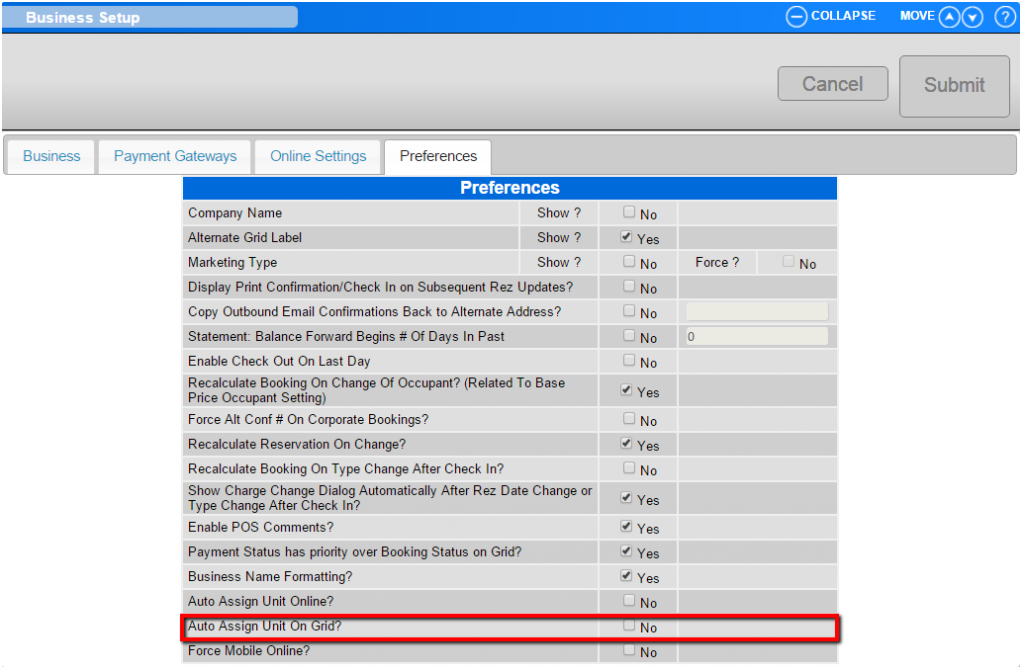
- Click on Business Setup.
- Click on the Preference tab.
- Tick the Auto Assign Unit on Grid setting.
- Making a Reservation:
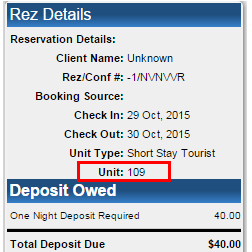
- After enabling the setting, when an operator drags out a Reservation Quote on the Grid and presses Rez Quote, the unit selected will automatically be assigned to the reservation.
- Operators can use both the Calendar Quote Submit button and the Rez Quote button to make a reservation and have the selected unit/site assigned.
- Operators can still reassign/unassign the reservation in the future if required.
Troubleshooting
- Ensure that the Auto Assign Unit on Grid setting is ticked if the unit is not automatically assigned.
- Verify that you have the necessary permissions to access the Business Setup and Preference tab.