Creating Multiple Accounts Receivable for Clients
Last modified on:
Overview
This document provides instructions on how to create multiple Accounts Receivable (AR) accounts for a client.
Prerequisites
- Ensure the client has an existing account. If not, refer to the guide on "How to Create an Account for a Client."
Steps
- Access the Account Menu
- Click "Account" from the Menu Bar. - Search for the Client
- Locate the client you wish to assign credit to.
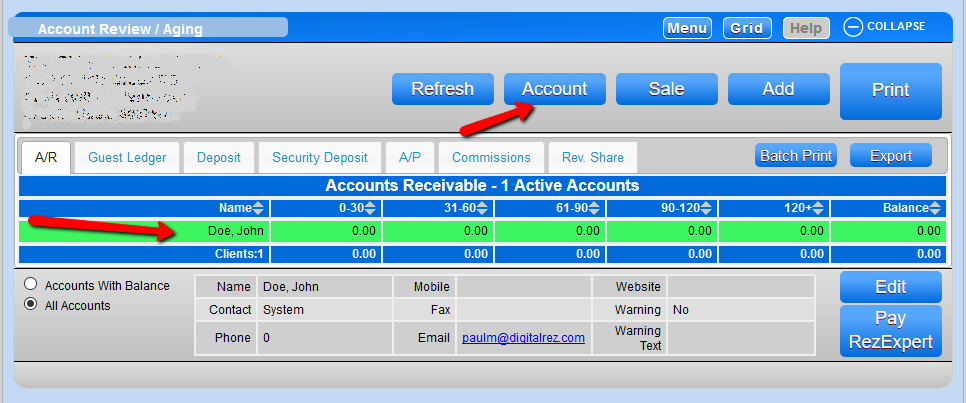
- Open the Account Manager
- Click the "Account" button.
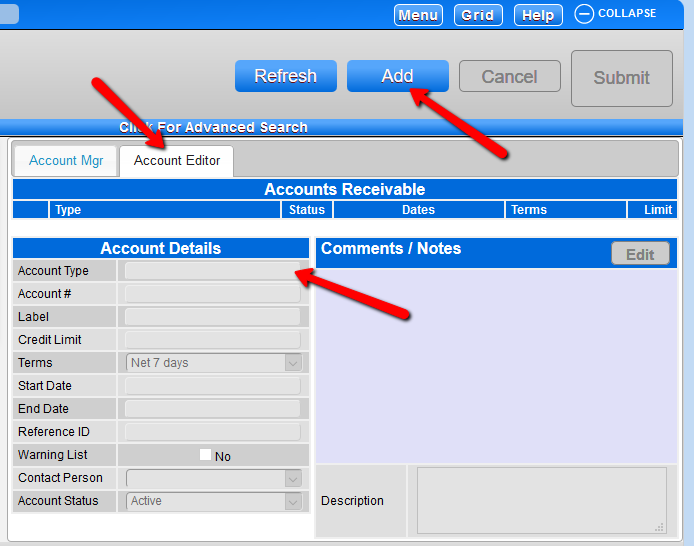
- Add a New Account
- Navigate to the Account Editor tab and click "Add." - Set Account Type
- Select "Accounts Receivable" under Account Type and click "Submit." - Repeat as Necessary
- Repeat steps 2 to 5 for any additional accounts required.
Troubleshooting
- For further assistance, contact support at 888 777-0602 or email support@digitalrez.com.