Paying Bills in RezExpert System
Last modified on:
Overview
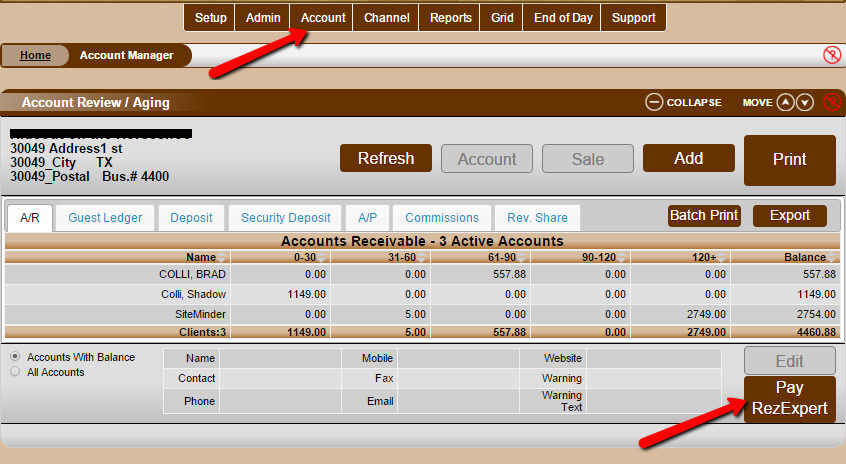
Users can make payments directly through the reservation system for their SaaS bill and/or the Online Reservation Commission. This functionality is accessible from within the Account page, where users can view their statement and make payments towards their account(s).
Prerequisites
- Access to the RezExpert reservation system.
- An active account with outstanding SaaS bill and/or Online Reservation Commission.
Steps
- Navigate to the Account page in the reservation system.
- Enter the amount you wish to pay in the "Account Payable as at ..." Payment window.
- Click the "Make Payment" button and follow the instructions provided.
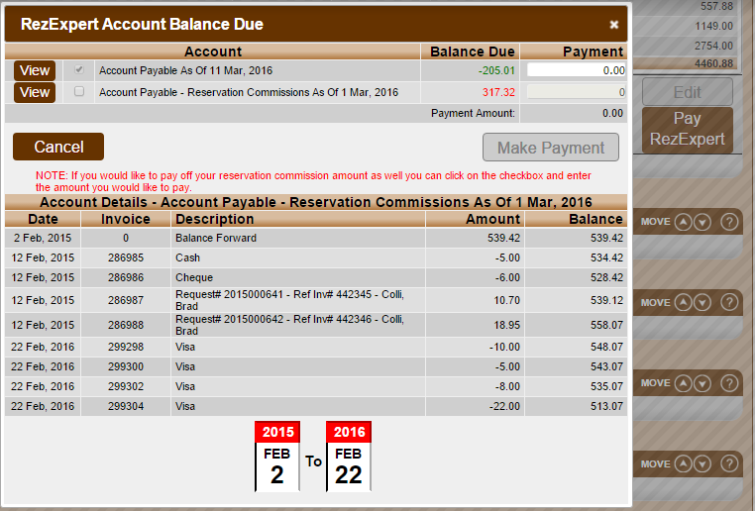
- Click the "View" buttons to review your account details for each account.
Troubleshooting
- Ensure you are entering the correct payment amount.
- Verify that your account details are accurate by using the "View" buttons.