Unit Type Category Setup and Reporting
Last modified on:
Overview
The Unit Type Category Setup allows categories to be created and assigned to Unit Types. This groups Unit Types together for reporting and data export purposes.
Prerequisites
- Access to the Menu button and Setup tab in the application.
Steps
Location
- Click on a Menu button.
- Navigate to the Setup tab.
- Click on Unit Type Category Setup.
Add
- Click Add to create a Unit Type Category.
- Name: Label of Category, e.g., Camping.
- Priority: Order of appearance in Unit Type Setup and reports.
- Once all required Categories have been created, they can be assigned to Unit Types in Unit Type Setup.

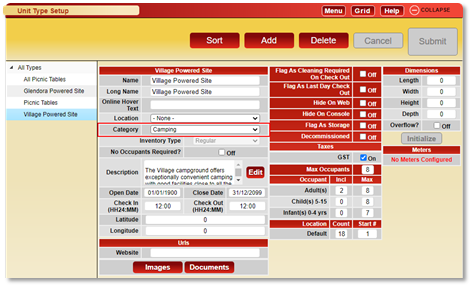
Assigning Categories to Unit Types
- Click on a Menu button.
- Navigate to the Setup tab.
- Click on Unit Type Setup.
- Select the Unit Type from the tree list on the left.
- Click on the Category dropdown and select the required Category.
Available Reports and Exports
Available Reports
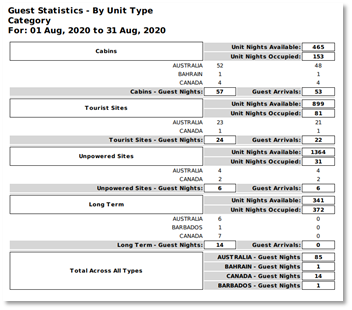
- Guest Statistics – By Unit Type Category
- Location: Click on a Menu button, select the Reports tab, and select the report within the Manager category.
- The report will display:
- Unit Nights Available
- Unit Nights Occupied
- Data is broken out into Client Country, with a Category Total and a Total across all Categories.
- Example of Report:
- Unit Type Category Revenue and Occupancy
- Location: Click on a Menu button, select the Admin tab, and click Type Revenue & Occupancy.
- The report will display Revenue and Occupancy statistics by Unit Type Category for the date range selected.
- Includes:
- Occ#: Unit Nights Occupied
- Avail#: Unit Nights Available
- Total Revenue
- Total Tax
of Rez: Number of reservations
- Example of Report:

Available Exports
- Guest Statistics By Unit Type Category
- Revenue/Occupancy By Unit Type Category
- Location: Click on a Menu button, select the Admin tab, and click Import/Export Utility.
- Click on the Export tab and select the Export Option from the dropdown.
- These export options allow the data reported within the reports to be exported into an Excel spreadsheet.
Click here to view the help document
Troubleshooting
- Ensure you have the necessary permissions to access the Setup and Admin tabs.
- Verify that the correct categories are created and assigned to Unit Types for accurate reporting.