Hiding Products from POS System
Last modified on:
Overview
This guide provides instructions on how to hide a product from the Point of Sale (POS) system.
Prerequisites
- Access to the Menu and Setup tab
- Permissions to modify Products and Services
Steps
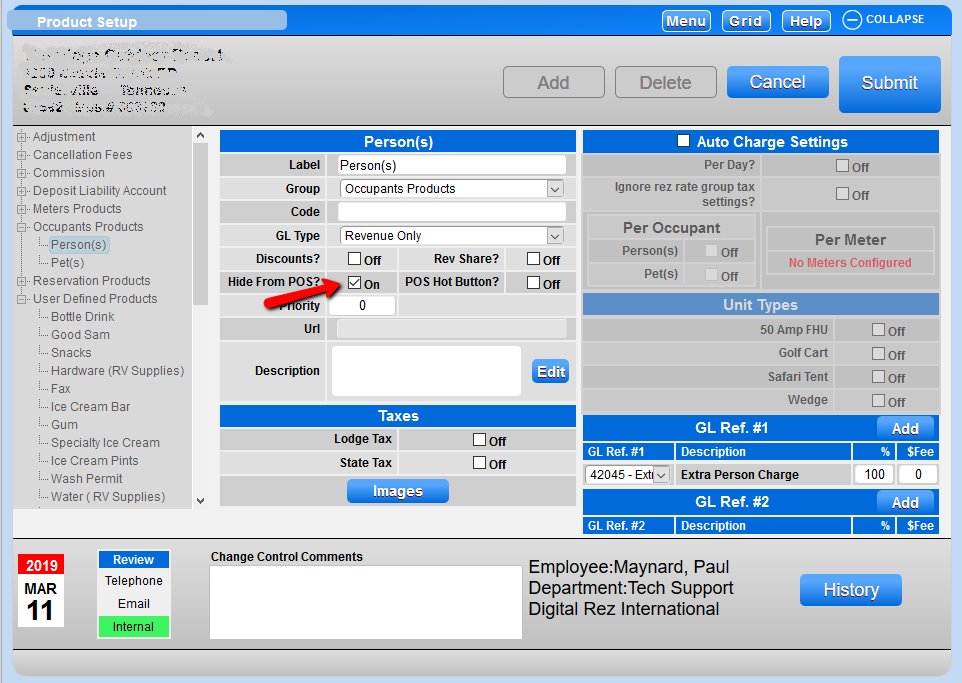
To hide a product from the POS, follow these steps:
- Go to the Menu and then the Setup tab.
- Select Products and Services.
- Choose the required product.
- Tick the Hide from POS box.
- Press Submit.
Troubleshooting
If you need further assistance, please contact support:
- Phone: 888 777-0602
- Email: support@digitalrez.com