Allocating Payments in Guest Folio
Last modified on:
Overview
Payments can be allocated to specific charges, such as the Park Entrance Fee, within a checked-in reservation.
Prerequisites
- Access to the Guest Folio of a checked-in reservation.
Steps
Guest Folio
- Navigate to the checked-in reservation’s Guest Folio.
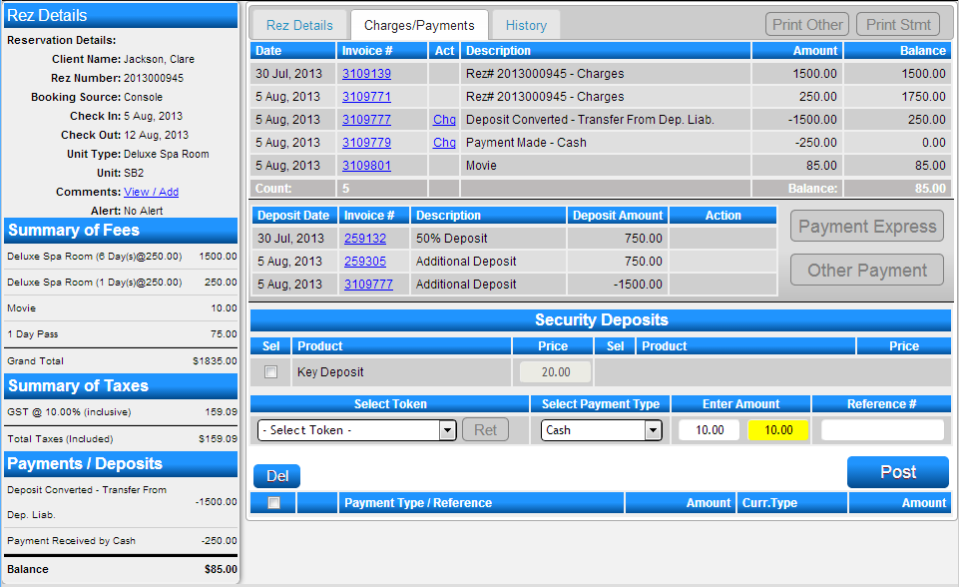
- Click on the Charges/Payments tab.
- Select Other Payment.
Posting the Payment
- Select the Payment Type.
- Enter the payment amount.
- Click Post.
- After posting, click Alloc before submitting the payment to allocate it to a specific charge.

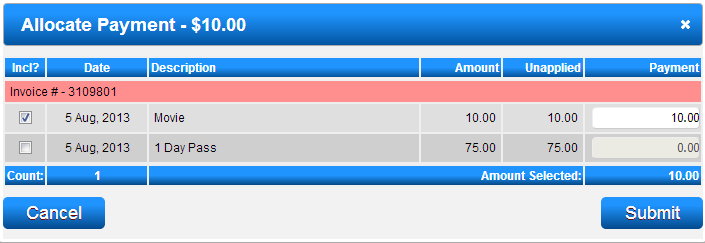
Allocate Payment
- Within the Allocate Payment panel, select the charge to which you wish to allocate the payment.
- Press Submit to accept the allocation.
Submit
- After allocating the payment, press Submit to process the payment.
Troubleshooting
- Ensure that the correct charge is selected before submitting the allocation.
- Verify that the payment amount matches the intended charge.