Reservation Fee Policy Configuration Guide
Last modified on:
Overview
Reservation Fees can be set up to apply to reservations, such as Booking fees, One night surcharges, etc.
Prerequisites
- Access to the Setup tab within the Business Setup section.
Steps
Location
- Click on a Menu button.
- Select the Setup tab.
- Click on Rez Fee Policy Setup within the Business Setup section.
Add
- Click Add.
- Enter the name of the Reservation Fee.
- Click Submit.
Policy Applicability
Link To Unit Type
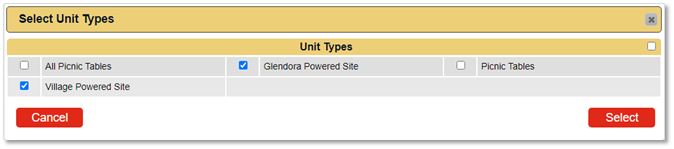
- The reservation fee can apply to all Unit Types or selected Unit Type(s).
- To apply to selected Unit Type(s):
- Click on the Slider to activate.
- Click on the box and select the required Unit Type(s).
- When the slider is not activated and unit types are selected, the policy will apply to all Unit Types.
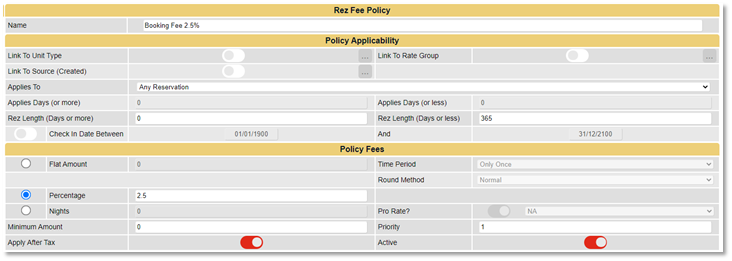
Link To Rate Group
- The reservation fee can apply to all Rate Groups or selected Rate Group(s).
- To apply to selected Rate Group(s):
- Click on the Slider to activate.
- Click on the box and select the required Rate Group(s).
- When the slider is not activated, the policy will apply to all Rate Group(s).
Link To Source (Created)
- The reservation fee can apply to all Sources (Console, Resort Web) or selected Source(s).
- To apply to selected Source(s):
- Click on the Slider to activate.
- Click on the box and select the required Source(s).
- When the slider is not activated, the policy will apply to all Source(s).

Applies To
- Select the policy applicability on how you want the policy to apply:
- Any Reservation
- Days Before Check In
- Days After Made Date
Applies Days (or more) and Applies Days (or less)
- Number of days for the policy applicability, e.g., 14 days prior to Check In.
Rez Length (Days or more) and Rez Length (Days or less)
- Length of reservation.
Check In Date Between
- Check In date range.
Policy Fees

- Enter the Policy Fee – charges relating to the Reservation Fee.
Flat Amount
- A set flat amount to be charged, e.g., $25.00.
- When Flat Amount is selected, Time Period and Rounding Method become available for selection.
- Time Period: Ability to select the time period the reservation fee is applied for. The Fee will be applied for the amount of time periods within the reservation. For example, if the Fee is set for the Time Period: Nights, the fee will be applied per Night of the reservation.
- Round Method: Ability to select the rounding method.

Percentage
- Percentage of the Reservation Charges, e.g., 50%.

Nights
- Number of nights charged as the Reservation Fee.
- Pro Rate: When Nights is selected, Pro Rate can be enabled. The fee will average out over the number of reservation nights divided by the number of nights penalty.

Minimum Amount
- A Minimum amount is charged, ideal when Percentage is used.
Priority
- Priority of the Reservation policy.
Charge Tax After Fee Calculated
- Tax is charged after the policy fee has been calculated. (For Tax exclusive Businesses only)
Apply After Tax
- The policy fee is applied after tax has been calculated. (Enable for Tax Inclusive businesses.)
Active
- Enable to make the policy active/available.
Troubleshooting
For further assistance, refer to the Help Document.