Unit Type URL Export and Integration
Last modified on:
Overview
Unit Type specific URLs enable webmasters to update or add Book Now buttons on a website, allowing guests to directly make reservations for specific Unit Types.
Prerequisites
- Access to the website's admin panel
- Permission to update URLs on the website
Steps
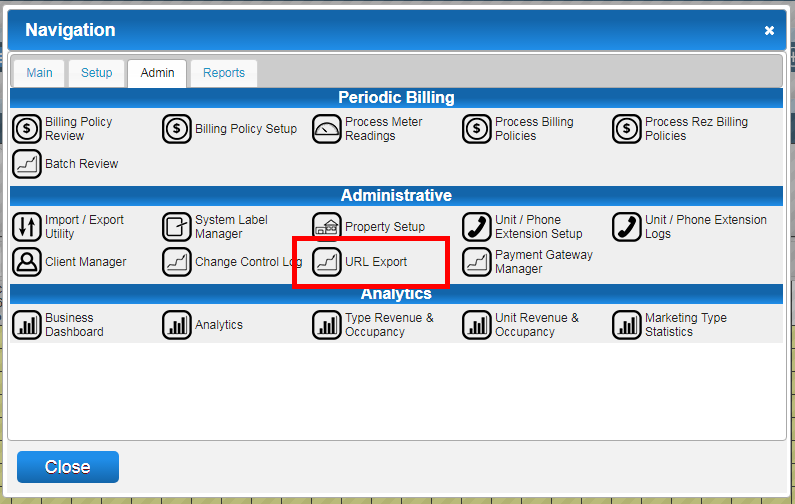
- Access URL Export:
- Click any Menu button.
- Navigate to the Admin tab.
- Select URL Export in the Administrative section.
- Embed URLs:
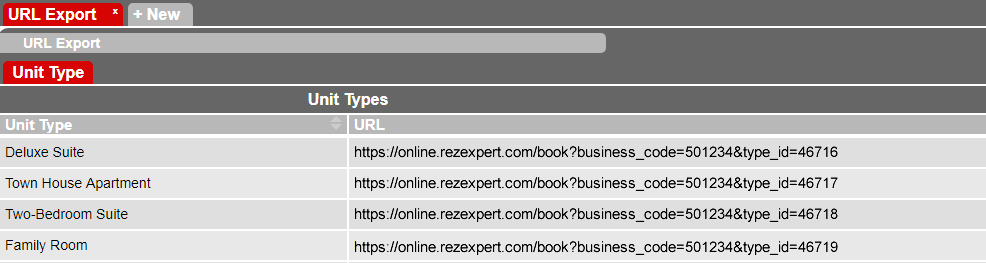
- On your website, embed each Unit Type URL behind the Book Now buttons listed next to your Unit Types.
- If you are not the webmaster, provide the URLs to them for implementation.
- Utilize the Print and Export options available at the top right of the panel to print or export the URLs.

Troubleshooting
- Guests Clicking Book Now:
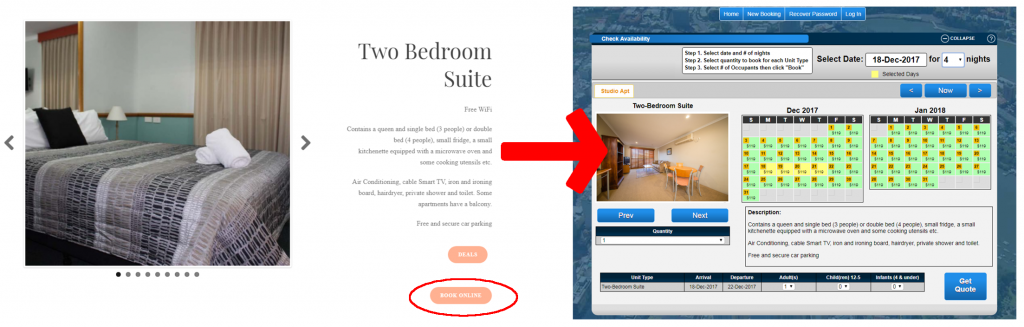
- Once the Unit Type URLs are placed on the website, guests clicking a Book Now button next to a Unit Type will be directed to that Unit Type's online Availability Grid.
- Note that the Unit Type Online Booking interface differs from the All Types Online Booking interface and cannot be adjusted within the Online Settings tab of Business Information.
- For further assistance, download the PDF Help Document.