Weekend and Weekday Rate Configuration
Last modified on:
Overview
Weekday preferences are periods of days of the week that you wish to attach particular rates to, such as a higher daily rate from Friday to Sunday.
Prerequisites
- Access to the Menu button
- Ability to navigate to the Setup tab
Steps
Location
- Click on a Menu button.
- Select the Setup tab.
- Click on Weekend/Weekday Setup.
Current Default Setting
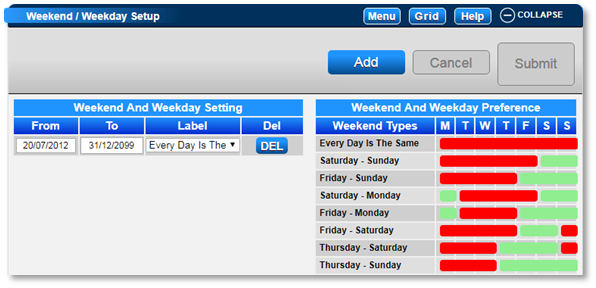
- The default setting for the Weekday/Weekend is Every Day Is The Same.
- This indicates that all days of the week are the same rate.
Adjusting the Setting
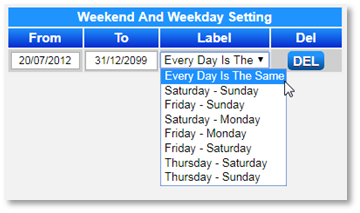
- If your Weekend rates differ from the Weekday rates, click on the Label dropdown to select the required setting.
- Use the Weekend and Weekday Preference diagram on the right to identify the right selection required.
- Date Range: You can set up multiple Weekday/Weekend settings to apply throughout the year.
- Adjust the End date on the first setting to be the last day it is applicable.
- Click Add to create the next setting.
- Adjust the To date and End date for the required date range.
Rate Setup
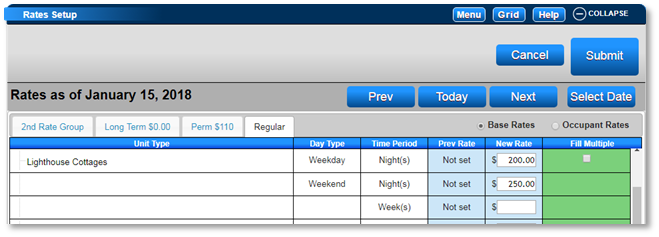
- Once your Weekend setting has been adjusted, your Rate Setup panel will display two Day types: Weekday and Weekend.
- Enter the weekday and weekend rates in the New Rate column for the Unit Type Base rates.
- The Occupant Rates can also have different weekday/weekend rates if needed.
- If the rates are the same, enter the rate into both New Rate columns.
Troubleshooting
- Ensure that the correct settings are selected in the Label dropdown.
- Verify that the date ranges are correctly set for each Weekday/Weekend setting.