Creating Business Records in RezExpert
Last modified on:
Overview
Businesses or companies can have their own Corporate Record created in RezExpert. This feature allows for the creation of Business/Corporate Reservations and the storage of employee details if required.
Prerequisites
- Access to the RezExpert system.
Steps
Search
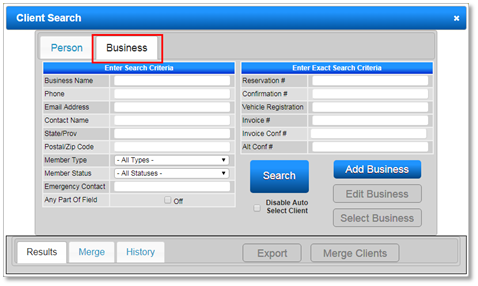
- Click on the Search button on the Availability Grid.
- Navigate to the Business tab.
- Click the Add Business button.

Client Editor
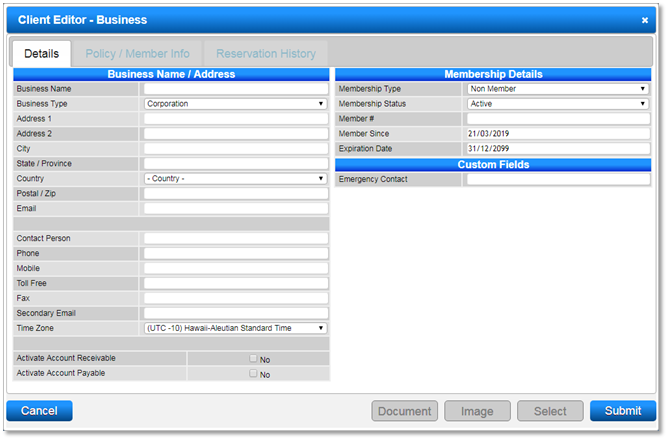
- The Client Editor - Business file will display for entering Business Details.
- Enter the Business name.
- Select the Business Type: Corporation.
- Fill in other required business details such as Address, Phone, and Email address.
- Ensure the Member Type is set to Non Member.
- Accounts Receivable: If applicable, activate the Account Receivable flag.
- Click Submit to finalize.
- Business Corporate Records can also be created in the Client Editor panel:
- Scroll down and expand the Client Editor panel.
- Click Add and select the Client Type: Business.
- Enter the Business Name and Business Details.
- Fill in other required business details.
- Ensure the Member Type is set to Non Member.
- Click Submit to finalize.
Troubleshooting
- Reservations can be made under the Business (Corporate) name, with the option to record the staying Employee's name(s), if required.
For more information, you can: