Content Assignment Setup in RezExpert
Last modified on:
Overview
Content Assignment Setup is used to assign custom emails, reports, and forms in RezExpert.
Prerequisites
To access Content Assignment Setup:
- Click on a Menu button.
- Select the Admin tab.
- Select Content Assignment Setup within the Administrative section.

Steps
Content Assignment Group
- Content Assignment Group separates Console and Resort Web (Online) settings into different groups.
- Click on the group to expand the listing.
- Reports or forms created in Content Setup can be assigned to the relevant area.
- An assignment is done by clicking the 3-dot circle or by using the drop-down selector.
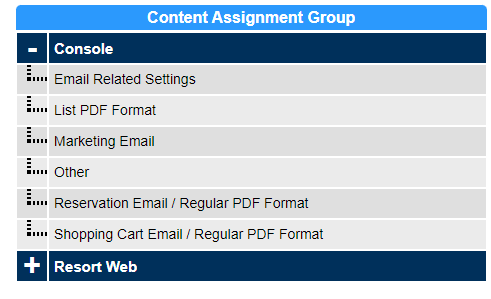
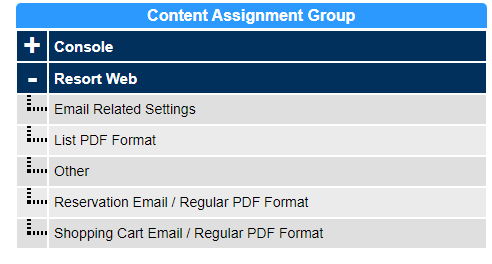
Console
Email Related Settings
- Auto Assign Rez Confirmation: Rez HTML Content to be automatically attached to the reservation Confirmation email.
- Auto Assign Shopping Cart Confirmation: Shopping Cart HTML Content to be automatically attached to the Shopping Cart Confirmation email.
- Default Reservation Email For Auto Assignment: Main confirmation email for the automatic attachments.
- Default Shopping Cart confirmation For Auto Assignment: Main Shopping Cart confirmation email for the automatic attachments.
List PDF Format
- Ability to create custom list style reports and assign to selected destinations.
- Account Manager: Content to appear in the Account Manager panel.
- Account Manager - Rev Share: Content to appear in the Account Manager for a Revenue Share account.
- Arrivals/Departures - Arrival: Print button within the Arrivals tab of the Arrivals/Departures panel on the Availability Grid.
- Arrivals/Departures - General: Print button within the General tab of the Arrivals/Departures panel on the Availability Grid.
- Arrivals/Departures - Registered: Print button within the Registered tab of the Arrivals/Departures panel on the Availability Grid.
- Console - Daily Closure: Final Daily Closure Print options.
- Income: Report Manager - Income section.
- Manager: Report Manager - Manager section.
- Payment Audit: Payment Audit panel.
- Rez Pay Manager: Rez Pay Manager panel; for RezPay payment gateway only.
Marketing Email
- Marketing - Auto Assign After Reservation: Content automatically assigned to the marketing email sent after the reservation has checked out. Content Type: Rez HTML
- Marketing - Auto Assign After Shopping Cart: Content automatically assigned to the marketing email sent after the shopping cart (group booking) has checked out. Content Type: Shopping Cart HTML
- Marketing - Auto Assign Before Reservation: Content automatically assigned to the marketing email sent before the reservation's Check-in date. Content Type: Rez HTML
- Marketing - Auto Assign Before Reservation Check Out: Content automatically assigned to the marketing email sent before the reservation's Check-out date. Content Type: Rez HTML
- Marketing - Auto Assign Before Shopping Cart: Content automatically assigned to the marketing email sent before the Shopping Cart's Check-in date. Content Type: Shopping Cart HTML
- Marketing - Auto Assign Before Shopping Cart Check Out: Content automatically assigned to the marketing email sent before the Shopping Cart's Check-out date. Content Type: Shopping Cart HTML
- Marketing For Corporate: Email content/templates for Corporate marketing emails. Content Type: Shopping Cart HTML
- Marketing For Permits: Email content/templates for Permit marketing emails. Content Type: Shopping Cart HTML
- Marketing For Regular Reservation: Email content/templates for single reservation marketing emails. Content Type: Rez HTML
- Marketing For Standard Group: Email content/templates for Group Bookings marketing emails. Content Type: Shopping Cart HTML
- Marketing For Travel Agent: Email content/templates for Travel Agent marketing emails. Content Type: Shopping Cart HTML
- Marketing For Wholesaler: Email content/templates for Wholesaler marketing emails. Content Type: Shopping Cart HTML
Other
- SMS Public Payment: SMS message body sent in Public Payment SMS option. Content Type: Plain Text.
Reservation Email / Regular PDF Format
- Channel Rez Confirmation: Email content for Channel / GDS Bookings. Content Type: Shopping Cart HTML
- DTTM Rez Confirmation: Email content for DTTM bookings. Content Type: Rez HTML
- Reservation Batch Print: Content for Batch Print option in Arrivals/Departures panel. Content Type: Rez HTML
- Rez Cancellation: Content for cancelled reservation - Print Other. Content Type: Rez HTML
- Rez Check In: Content for Checked In reservation - Print Other. Content Type: Rez HTML
- Rez Confirmation: Content for Confirmed reservation - Print Other. Content Type: Rez HTML
- Rez Object Setup: Content available to display in Rez Object Setup. Content Type: Rez HTML
- Rez Statement: Content for any reservation - Print Stmt. Content Type: Rez HTML
Shopping Cart Email / Regular PDF Format
- Shopping Cart (Group) Confirmation: Content for Confirmed Group Bookings - Print Other. Content Type: ShoppingCart HTML
- Shopping Cart (Group) Corporate Confirmation: Content for Confirmed Corporate (Business) bookings - Print Other. Content Type: ShoppingCart HTML
- Shopping Cart (Group) Corporate Statement: Content for Corporate (Business) bookings - Print Stmt. Content Type: ShoppingCart HTML
- Shopping Cart (Group) DTTM Confirmation: Content for Confirmed DTTM Group Bookings - Print Other. Content Type: ShoppingCart HTML
- Shopping Cart (Group) Statement: Content for all Group Bookings - Print Stmt. Content Type: ShoppingCart HTML
- Shopping Cart (Group) TA Confirmation: Content for Confirmed Travel Agent bookings - Print Other. Content Type: ShoppingCart HTML
- Shopping Cart (Group) Statement: Content for Travel Agent bookings - Print Stmt. Content Type: ShoppingCart HTML
- Shopping Cart (Group) Wholesaler Confirmation: Content for Confirmed Wholesaler bookings - Print Other. Content Type: ShoppingCart HTML
- Shopping Cart (Group) Wholesaler Statement: Content for Wholesaler bookings - Print Stmt. Content Type: ShoppingCart HTML
- Shopping Cart (POS) Confirmation: Content for Point of Sale / Shopping Cart transactions performed in the New Sale/Quote screen - Print Receipt and Print Other button within the Shopping Cart guest folio. Content Type: ShoppingCart HTML
- Shopping Cart (POS) Statement: Content for Point of Sale / Shopping Cart transactions when viewed in the Shopping Cart guest folio - Print Stmt. Content Type: ShoppingCart HTML
- Shopping Cart Confirmation Rez Custom Wildcard: Selecting the Custom Wildcard content for the Shopping Cart Confirmation. NOTE: Only one can be selected. Content Type: Custom Wildcard.
- Shopping Cart Corporate Rez Custom Wildcard: Selecting the Custom Wildcard content for the Corporate Shopping Cart content. NOTE: Only one can be selected. Content Type: Custom Wildcard.
- Shopping Cart DTTM Confirmation Rez Custom Wildcard: Selecting the Custom Wildcard content for the DTTM Shopping Cart confirmation. NOTE: Only one can be selected. Content Type: Custom Wildcard.
- Shopping Cart Travel Agent Rez Custom Wildcard: Selecting the Custom Wildcard content for the Travel Agent Shopping Cart content. NOTE: Only one can be selected. Content Type: Custom Wildcard.
- Shopping Cart Wholesaler Rez Custom Wildcard: Selecting the Custom Wildcard content for the Wholesaler Shopping Cart content. NOTE: Only one can be selected. Content Type: Custom Wildcard.
- Shopping Cart Email - Inc. Individual DTTM Rez Content: Ability to select which DTTM Rez HTML will display as an attachment option when sending a Group DTTM Confirmation. Content Type: Rez HTML.
- Shopping Cart Email - Inc. Individual Rez Content: Ability to select which Rez HTML will display as an attachment option when sending a Shopping Cart (Group) Confirmation. Content Type: Rez HTML.
Resort Web
- Settings for the Online Booking interface print and email options.
Email Related Settings
- Auto Assign Rez Confirmation: Rez HTML Content to be automatically attached to the reservation Confirmation email. Content Type: Rez HTML
- Auto Assign Shopping Cart Confirmation: Shopping Cart HTML Content to be automatically attached to the Shopping Cart Confirmation email. Content Type: ShoppingCart HTML
- Email - Public Payment: The public payment email template sent. NOTE: Only one can be selected. When Blank is selected, the system default will be sent. Content Type: Public Payment HTML
- Email Reset Password: Email sent when a customer resets their password. NOTE: Only one can be selected. When Blank is selected, the system default will be sent. Content Type: Reset Password HTML
List PDF Format
- Account Statement: Select the Account statement for the customer to view when allowed. Content Type: Client Account HTML
Other
- Ability to select custom text to appear on select areas of the Confirmation page.
- Rez Confirmation: Text to appear on the confirmation page at the end of the booking process. Text will appear below the standard Confirmation page message. Content Type: Static HTML
- Rez Payment Confirmation: Text to appear on the confirmation page at the end of the additional payment process. Text will appear below the standard message. Content Type: Static HTML
Reservation Email / Regular PDF Format
- Ability to select the Email/Content for online purchases and Guest Portal.
- DTTM Rez Confirmation: Email for DTTM bookings. NOTE: Only one can be selected. When Blank is selected, the system default will be sent. Content Type: Rez HTML
- Package Activity Print: Print option for package shopping carts within the Packages section of the Reservation Activity on the online Guest Portal. Content Type: ShoppingCart HTML
- Rez Activity Cancelled Print: Print content for cancelled bookings within the Reservations section of the Reservation Activity on the online Guest Portal. Content Type: Rez HTML
- Rez Activity Checked In/Out Print: Print content for checked in/out bookings within the Reservations section of the Reservation Activity on the online Guest Portal. Content Type: Rez HTML
- Rez Activity Confirmed Hide Unit Print: Print content for confirmed bookings within the Reservations section of the Reservation Activity on the online Guest Portal. For businesses with the Hide Unit flag enabled in Resort Web Setup. Content Type: Rez HTML
- Rez Activity Confirmed Unit Print: Print content for confirmed bookings within the Reservations section of the Reservation Activity on the online Guest Portal. Content Type: Rez HTML
- Rez Cancellation Email: Email sent when customers cancel/request to cancel their booking online. NOTE: Only one can be selected. When Blank is selected, the system default will be sent. Content Type: Rez HTML
- Rez Check In Email: Email sent when customers check in their booking in the online Guest Portal. NOTE: Only one can be selected. When Blank is selected, the system default will be sent. Content Type: Rez HTML
- Rez Confirmation Email: Email sent when a customer makes an online regular booking. NOTE: Only one can be selected. When Blank is selected, the system default will be sent. Content Type: Rez HTML
- Rez Request Email: Email sent when a customer makes a request based online regular booking. For businesses with the Request Based Bookings flag enabled in Resort Web Setup. Content Type: Rez HTML
Shopping Cart Email / Regular PDF Format
- Shopping Cart (Group) Confirmation Email: Email sent when a Shopping Cart Group Booking is made online. NOTE: Only one can be selected. When Blank is selected, the system default will be sent. Content Type: ShoppingCart HTML
- Shopping Cart (Group) Corporate Email: Email sent when a Corporate/Business Booking is made online. NOTE: Only one can be selected. When Blank is selected, the system default will be sent. Content Type: ShoppingCart HTML
- Shopping Cart (Group) Travel Agent Email: Email sent when a Travel Agent booking is made online. NOTE: Only one can be selected. When Blank is selected, the system default will be sent. Content Type: ShoppingCart HTML
- Shopping Cart (Group) Wholesaler Email: Email sent when a Wholesaler booking is made online. NOTE: Only one can be selected. When Blank is selected, the system default will be sent. Content Type: ShoppingCart HTML
- Shopping Cart Confirmation: Text to appear on the confirmation page at the end of the booking process. Text will appear below the standard Confirmation page message. Content Type: Static HTML
- Shopping Cart Confirmation Email: Email sent when a Shopping Cart purchase/package is made online. NOTE: Only one can be selected. When Blank is selected, the system default will be sent. Content Type: ShoppingCart HTML
- Shopping Cart Confirmation PDF: PDF Content for the Shopping Cart bookings. Content Type: ShoppingCart HTML
- Shopping Cart DTTM (Group) Confirmation Email: Email sent when a DTTM Group booking is made online. NOTE: Only one can be selected. When Blank is selected, the system default will be sent. Content Type: ShoppingCart HTML
Content Setup
- Content Assignments can also be assigned to Content in Content Setup.
- For assignments that require only one content, the assignment must be handled within Content Assignment Setup.
Troubleshooting
N/A