Setting Up Travel Agent Business Records
Last modified on:
Overview
Travel Agents and Visitor Centres can be set up within RezExpert. Their commission percentages or flat fees can be configured to automatically calculate from their bookings. Travel Agents can book reservations, with their commission calculated from the reservation charges. The commission is then automatically sent to their Accounts Payable Account for payment when required. Travel Agents also have the option of logging into the Online Booking Interface, with Daily Inventory and rate view display.
Prerequisites
- Contact your Support representative to enable the Membership Module for your Business.
Steps
Member Type Setup
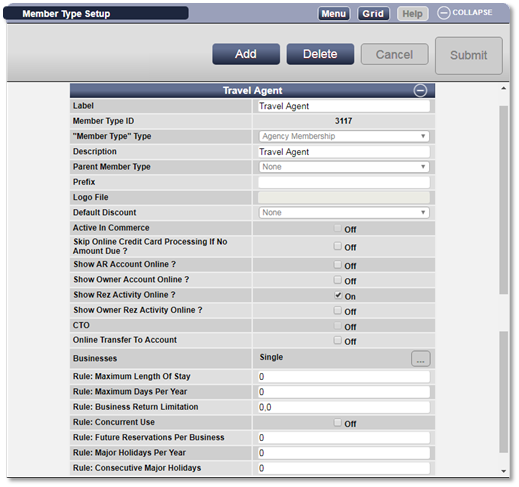
- A Member Type needs to be set up for Travel Agents.
- Click any Menu button, select the Setup tab, and click on Member Type Setup within the Admin/Accounting section.
- Click Add to add a new Travel Agent Member Type.
- Label: Travel Agency or Travel Agent.
- Member Type: Select Agency Membership.
- Description: Travel Agents.
- Default Rate Group: Regular. - Press Submit to finalize the new Member Type.
Client Editor
- After creating the Member Type, click on a Grid button.
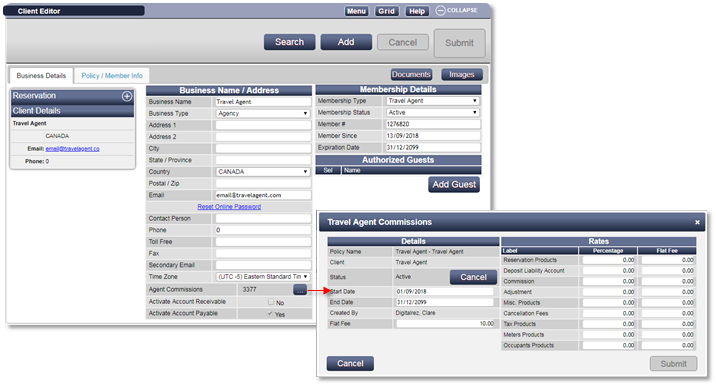
- Expand Client Editor and click Add. Select Business from the Client Type box. Alternatively, click on the Search button, select the Business tab, and click Add Business button.
- Enter the Business Name and Business Details.
- The Email Address will be their Online Login details.
- Business Type: Agency.
- Membership Details:
- Membership Type: Travel Agency
- Membership Status: Active
- Membership #: Enter the Travel Agent IATA Number, if required. - Press Submit to finalize the Travel Agent Business Record.
- A message box will appear requesting confirmation to activate AP Account for the Travel Agent, click Yes.
Travel Agent Commission Policy
- To set the Travel Agent Commission Percentage/Fee amount, select the Agent Commission box within the Business Record.
- Within the Agent Commissions box, enter the Percentage Rates or the Flat Fee Rates for all the product groups to be sold by the Travel Agent – Reservation Products and Occupant Products will be the usual products sold. If you sell other Products through your Travel Agents, e.g., Tour Package Products, enter the commission amount.
- Press Submit to finalize the entry. This Commission Policy is now Pending.
- Within Status, click Activate to make the commission policy active.
- Reservations can now be made for the Travel Agent and clients.
Troubleshooting
- For additional help, refer to the following resources:
- Print the Help Document
- How to create Travel Agent Reservations