Moving Reservations on Availability Grid
Last modified on:
Overview
This document outlines multiple methods to quickly move a reservation by changing the Unit/Site number on the Availability Grid.
Prerequisites
- Access to the Availability Grid
- RezExpert support tech contact for enabling specific modules
Steps
Till Tape
- Select the reservation on the Availability Grid.
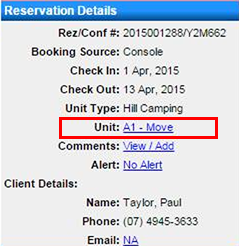
- On the Till Tape, click on the Unit hyperlink.
- If unassigned, the hyperlink displays "Unassigned - Assign."
- If assigned, the hyperlink displays "{Unit#} - Move."
- After clicking the hyperlink, the Available Units box will appear.
- Select the required unit and press "Select" to confirm.
Move Reservation - Right Click
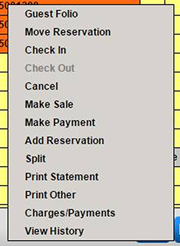
- Right-click the reservation on the Availability Grid to display the Right Click menu.
- Select "Move Reservation."
- The Available Units box will display. Select the required unit.
- Press "Select" to confirm.
Note: If the reservation needs to move Unit Types, open the Guest Folio to select the required Unit Type.
Click To Move
The Click To Move module adds a reservation management option within the Right Click functionality on the Availability Grid, allowing operators to quickly move a reservation to an open space.
Note: Contact your RezExpert support tech to enable the Module.
Right Click Menu
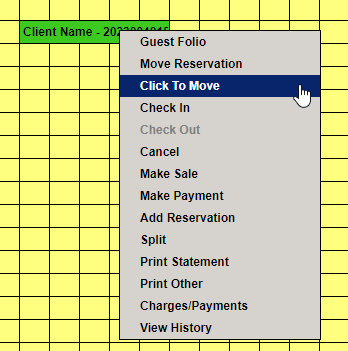
- On the Availability Grid, right-click on the desired reservation to open the Right Click menu.
- Click on "Click To Move."
Selecting New Site
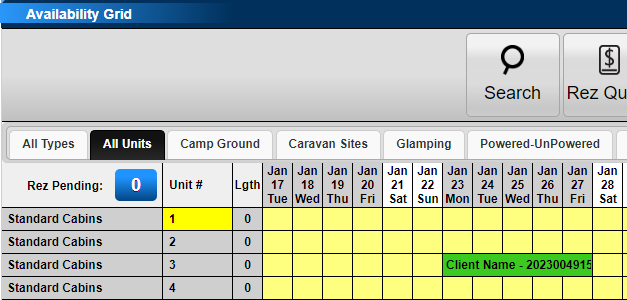
- A Click To Move message will appear on the top left of the Availability Grid.
- Click on the required new available site on the Availability Grid.
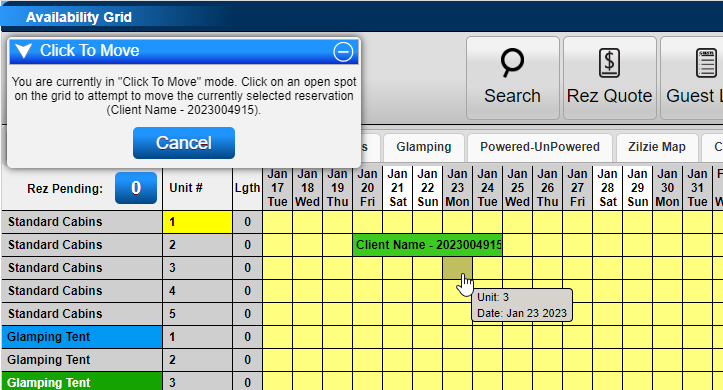
Note: Only available sites/units can be selected; adjustments are needed if the site/unit is occupied.
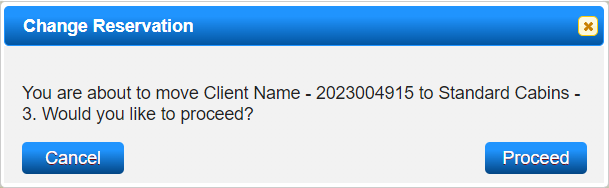
- A Change Reservation message will appear, informing the operator of the selected changes.
- Click "Proceed" to continue with the move.
Guest Folio
- The Guest Folio will appear, allowing for changes to Booking Details or Reservation Charges.
- Click "Submit" to finalize the move and any changes made in the Guest Folio.
- The reservation will automatically move to the selected new site/unit on the Availability Grid.
- A record of the change will be logged within the Guest Folio > History Tab for future reference.
Troubleshooting
For additional help, refer to the Help Document.