Location Setup and Management Instructions
Last modified on:
Location Setup allows you to configure coordinate points for map locations.
Overview
Location Setup enables users to configure coordinate points for map locations.
Prerequisites
- Access to the system with appropriate permissions to configure locations.
Steps
Accessing Location Setup
- Click any Menu button, then:
1. Click the Setup tab.
2. Select Location Setup in the Business Setup section.
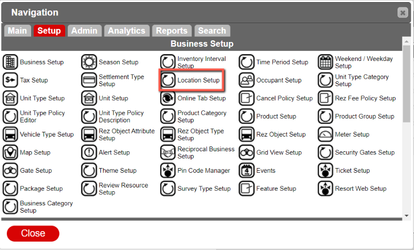
This loads the Location Setup Interface.
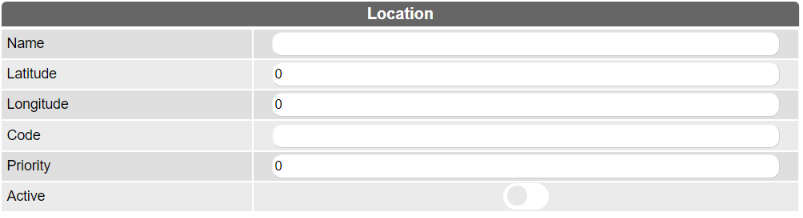
Adding a Location
- Click Add. The information inputs will become editable.
- Fill in the required information.
Descriptions
- Name: The name of the location point on the map.
- Latitude: The coordinate point that runs along the north-south axis.
- Longitude: The coordinate point that runs along the east-west axis.
- Code: The custom code used to identify the point.
- Priority: The positioning of the location relative to other locations.
- Active: Toggles the active state of the location on or off.
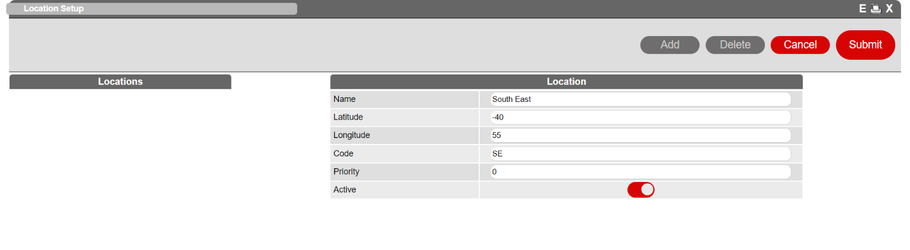
- Click Submit to save the entry. Click Cancel to discard it.
Deleting a Location
To delete a custom location:
- Select the location.
- Click Delete in the upper right corner.
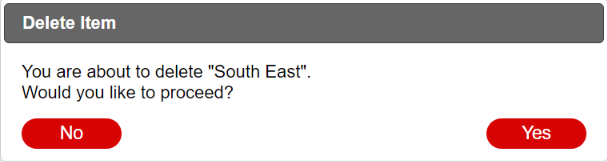
- Click Yes to confirm the deletion, or No to cancel.

Click Yes on the prompt to Delete or No to cancel the deletion process.
Troubleshooting
- Ensure you have the necessary permissions to access and modify location settings.
- Verify that all required fields are filled out correctly when adding a location.