Increase Maximum Occupants for Unit Type
Last modified on:
Overview
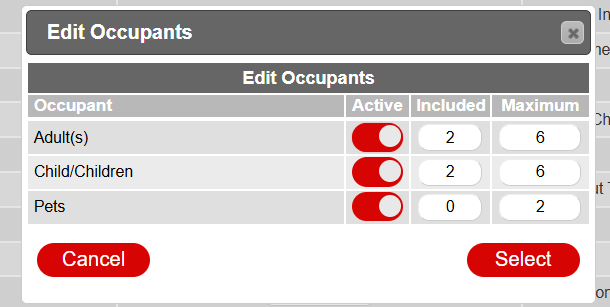
This document provides a step-by-step guide on how to increase the maximum number of occupants for a unit type.
Prerequisites
- Access to the system with appropriate permissions to modify unit settings.
Steps
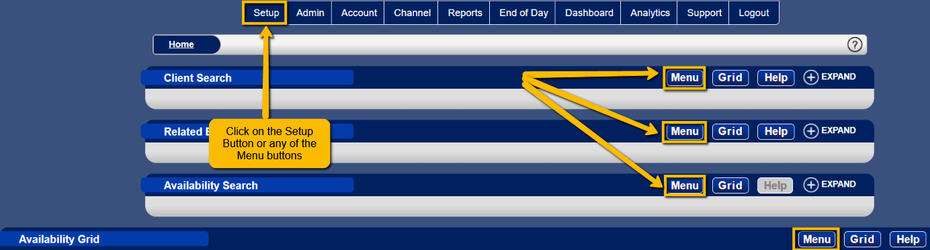
- Click the Menu button from the grid.
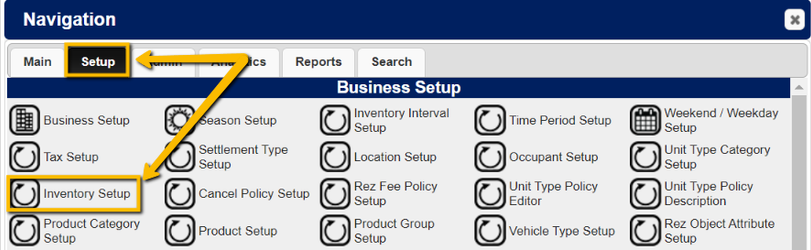
- Select Inventory Setup under the Setup tab.
- Choose the desired unit type from the list on the left.
- Click on the three dot button for Occupants in the Unit Type settings on the right.

Troubleshooting
- Ensure you have the necessary permissions to access and modify the unit settings.
- Verify that you are selecting the correct unit type from the list.