Adjust Inventory Check-In/Out Times
Last modified on:
Overview
This document provides instructions on how to adjust the check-in and check-out times for inventory.
Prerequisites
- Access to the inventory management system.
- Appropriate permissions to modify inventory settings.
Steps
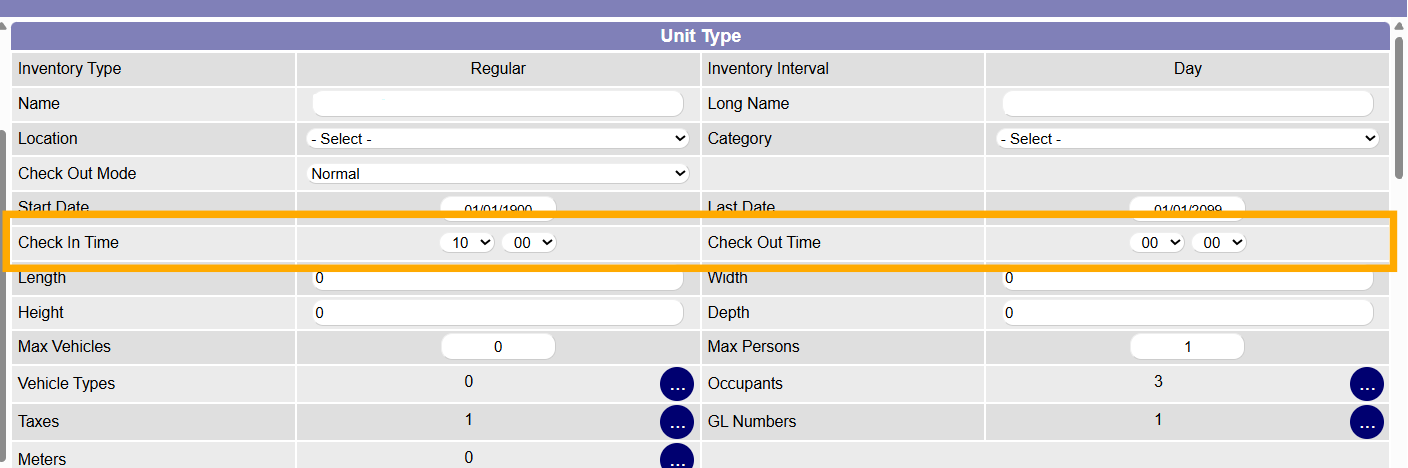
To adjust your check-in and check-out times, follow these steps:
- Click on the Menu button.
- Select Setup.
- Click on Inventory Setup.
- In the Unit Type tab (this is the default screen), select the Unit Type from the list on the left.
- Once you've selected the unit type, you'll be able to set the check-in and check-out times for that specific type.
Troubleshooting
- Ensure you have the necessary permissions to access and modify the inventory setup.
- If the Unit Type tab is not visible, verify that you are on the correct screen or contact support for assistance.