Changing Reservation Rates During Booking
Last modified on:
Overview
Individual reservation rates can be changed at the time of creation.
Prerequisites
- Access to the reservation system.
- Necessary permissions to edit reservation details.
Steps
New Booking
- When creating a new booking, enter the guest and booking details.
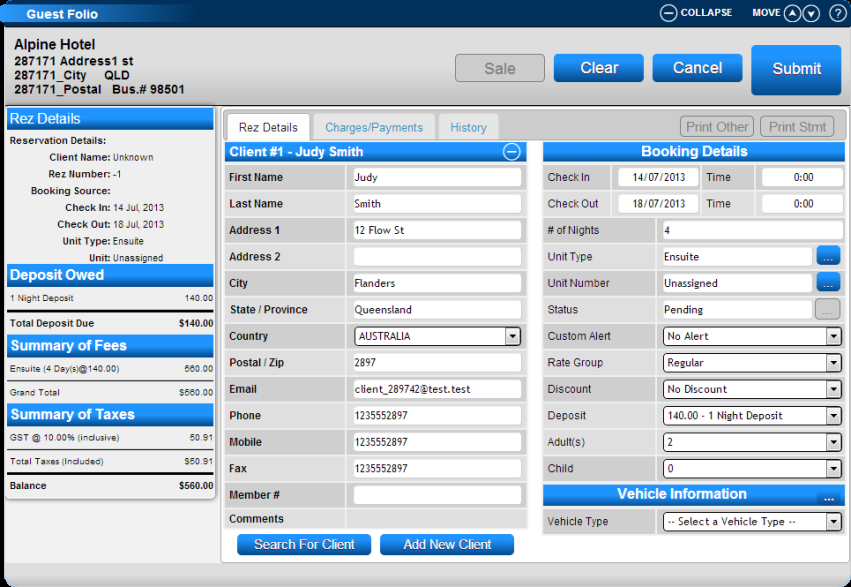
- Before submitting the reservation, navigate to the Charges/Payment tab.
Charges/Payment Tab
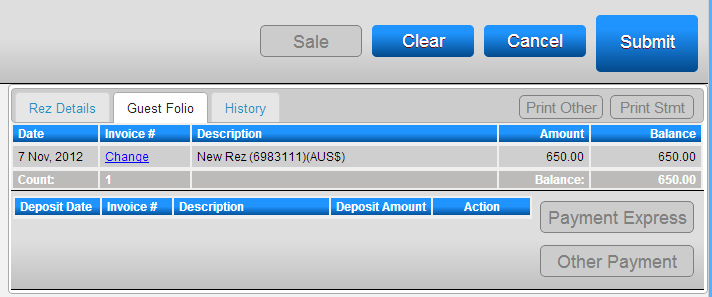
- Under "Invoice #", click on Change to modify the reservation charges and labels.
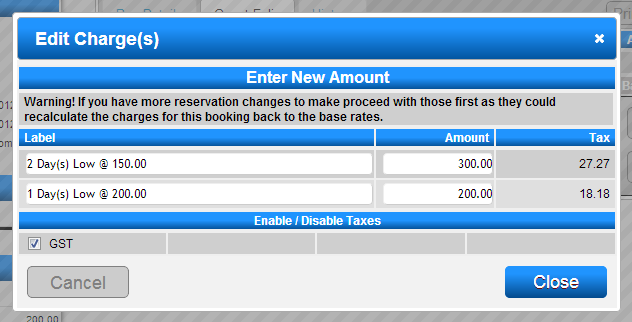
Edit Charge(s)
- The Edit Charge(s) box will appear, allowing you to change the label of the charge.
- Modify the charge in the Amount column and click Submit.
- The new tax will be calculated.
- Enter a comment to explain the rate change before clicking Close to finalize the new charges.
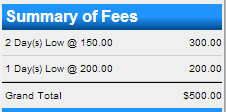
New Charges
- The new charges will be displayed on the till tape for the reservation.
- Proceed with the payment and completion of the reservation with the new charges.
Troubleshooting
- Ensure all fields are correctly filled before submitting changes.
- Verify that you have the necessary permissions to edit reservation rates.