Adding Attachments to Marketing Emails
Last modified on:
Overview
This feature allows you to include additional content created through the Content Setup as clickable links within your marketing emails. These links can be automatically inserted using the Marketing Auto Assign function.
Prerequisites
- Access to the admin panel
- Content setup in the system
Steps
Location
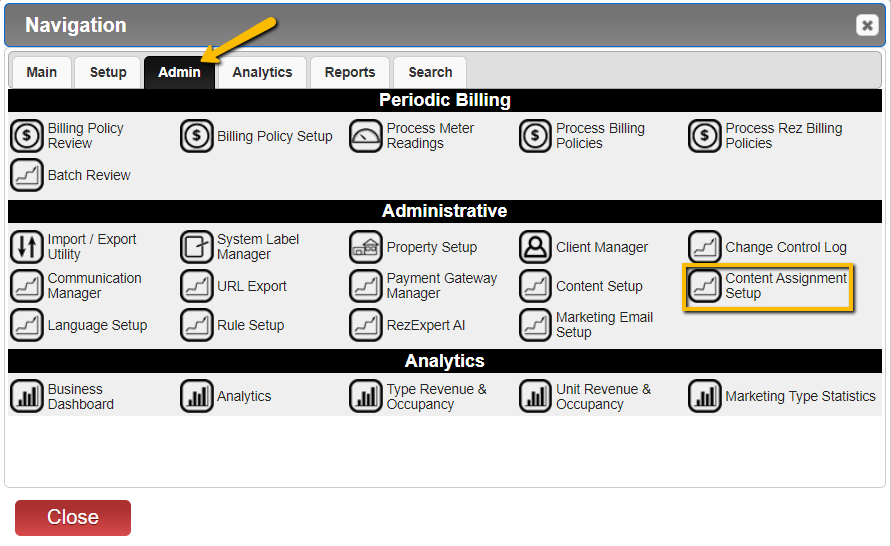
- Navigate to:
- Menu
- Admin
- Content Assignment Setup
- Click on Console.
- Select Marketing Email.
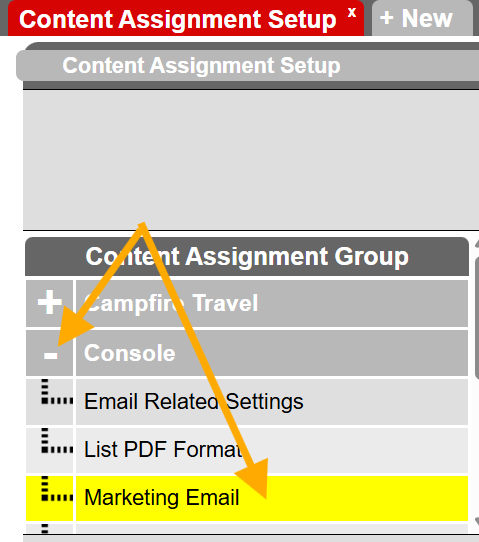
- Click on the three-dot button to access additional options.

- From the options presented, select the content you wish to assign:
- Regular Reservation
- Marketing - Auto Assign Before Reservation: Use this for marketing emails sent before the guest checks in.
- Marketing - Auto Assign After Reservation: Use this for marketing emails sent after the guest checks out.
- Marketing - Auto Assign Before Reservation CheckOut: Use this for emails sent shortly before the guest checks out.
- Group Reservation
- Marketing - Auto Assign Before Shopping Cart: Use this for emails sent shortly before the guest checks out.
- Marketing - Auto Assign After Shopping Cart: Use this for marketing emails sent after the guest checks out.
- Marketing - Auto Assign Before Shopping Cart CheckOut: Use this for emails sent shortly before the guest checks out.
Troubleshooting
- Ensure that the Content Setup is properly configured.
- Verify that the Marketing Auto Assign function is enabled.